Literally out of no where, I thought I was the only one.
Big thanks, @Bigbadabum, your workaround helped! 
This started happening to me as well - IMMEDIATELY after Steam did their stupid update!
They have been doing a lot of stuff to their software past week or so. Especially with controller functionality and Big Picture mode and whatnot…
This worked, thank you so very much. Hopefully they’ll properly fix this asap.
Thanks for this. I posted to a couple of players having this problem and so far it’s 50/50. Worked for one, not the other. Still, tyvm!
Thanks for posting this. It worked for me too.
My issue is slightly different. I am caught in eternal patch/validating loop. If anyone has an idea of how to fix please advise as this is exhausting.
Imagine trying to play a game and it tells you no… well that’s how I feel trying to play this game. big OOF and RIP error error error
Just heard this works on playstation as well
Check the workaround above
Greetings Everyone,
We are aware of the situation and currently looking into it.
In the meantime we’ve posted the following messages with some workaround steps as well.
https://forums.funcom.com/t/fatal-error-crashing-on-startup/219649
Thank you for your patience and understanding while we look into this.
Hi folks!
Perhaps the problem is on the side of the anti-cheat Battleye…
I think it’s some of problems with client-server data verification.
Perhaps the tls hash generation keys are tied to the server time or some other shit, such as the installed version of the program…
By resetting your internet connection at the moment you start the game, you are missing this access check…
Why do I think so? Because before, when you first started the game, Battleye logo with the head of the “blue panda” appeared, like in other games with this anti-cheat, but now this does not happen…
I have had the ‘fatal error’ message today, can not load up the game at all. I thought it was just me, so uninstalled and reinstalled the game just now but still not working.
Pls try the workaround from post #13, maybe it helps.
From the logs, we see that resetting the BattlEye update leads to the successful launch of the game:
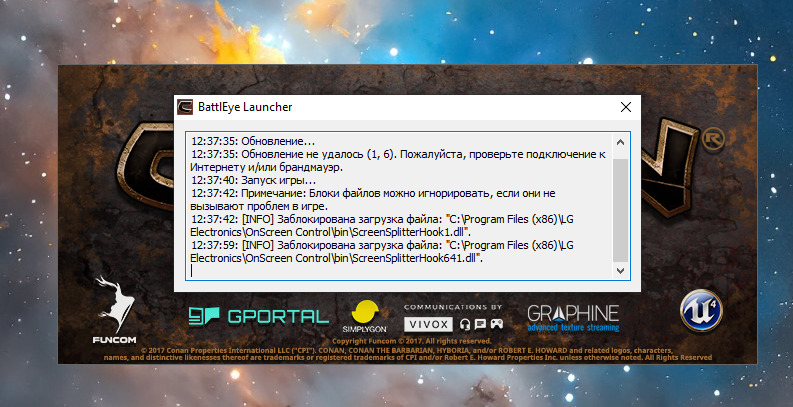
Logs:
12:37:34 pm: Starting the BattlEye service…
12:37:35 pm: Update…
12:37:35: Update failed (1, 6). Please check your internet connection and/or firewall.
12:37:40 pm: Starting the game…
12:37:42: Note: File blocks can be ignored if they don’t cause problems in the game.
Then there are logs with an error in the operation of the utility of my LG monitor, but this is a special case…
But! I start the game without battleEye, and have a crush!
Thanks a lot!
It’s working.
So I was playing fine today, then on my main PC it crashed with this same Fatal error, I found some forum where it said to delete my mods, then delete this one game file, that made it work for an hour, but now it doesn’t’ work again.
I then booted it up on my gaming laptop, same error, immediately crashed.
I reinstalled on my main PC, cleared the folders, downloaded through steam again… started it up, and crashed immediately.
I hate it cause if this game wasn’t so buggy or janky it would legitimately be one of the best games on the market, they nearly got a battle pass sub out of me.
yep same problem here too
wait what ?