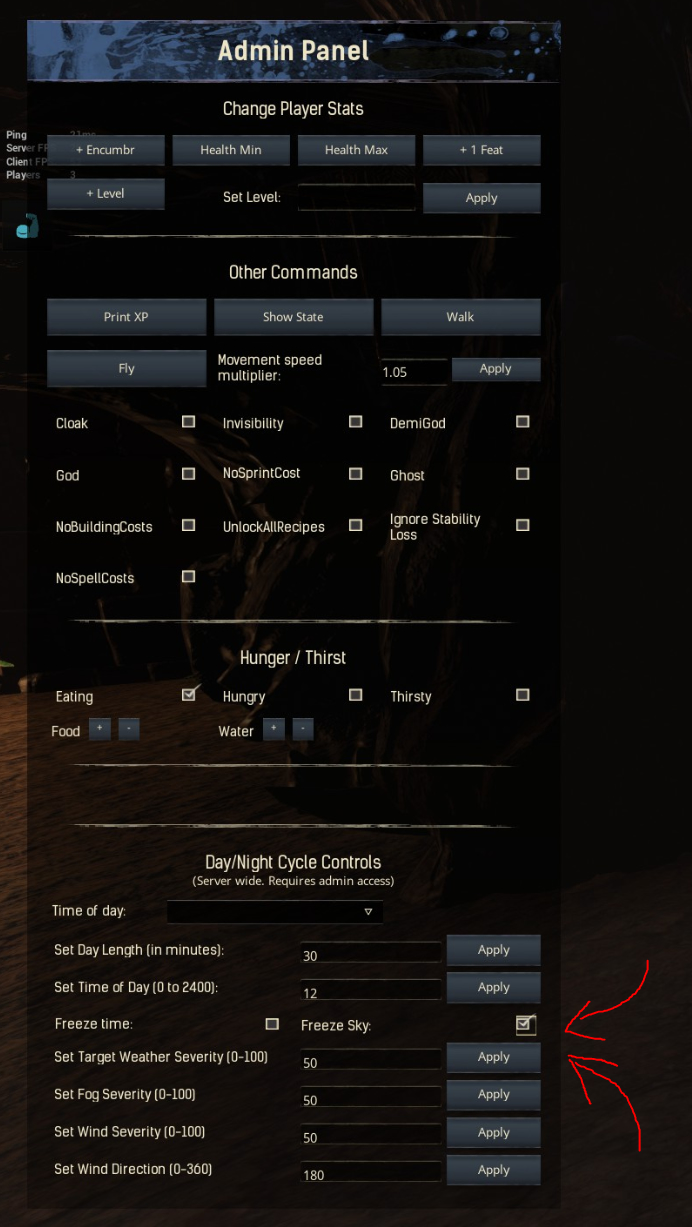
hi
im running a modded dedicated Server with DedicatedServerLauncher1800.
Since the Update in December the Sky freezes.
u can find this option in the Cheat Panel and check “Freeze Sky”.
i have to uncheck this in Admin mode every Server restart.
i dont want to delete map-mods
if i reconnect the sun freezes at the actual daytime, so if i reconnect at night, it stays night.
so for me it would be a fix to automatically run an admin-command after server restart
how can i implement the command:
DayNightCycle “Animate Day/Night Cycle” 1
I don’t know anything to answer your question, but you might find it useful to also post the question in this thread - it’s a thread that is directly maintained by the guy that creates and updates the direct server tool so if anyone would have the knowledge you need, it is likely he would. I hope that helps
No, that does not belong there The DSL is simply a tool that launches the server, it’s NOT the server.
However, as far as the topic goes, I’ve seen similar complaints recently and it was linked to ToT admin mods or so that are now able to freeze time across sessions, so that would be the first thing to check in the mod settings.
already checked
it has an option to “Restore Time Freeze On Reboot”
but i need sky freeze, cause the time just goes on
and when i relogg at nighttime, the sky stays night
relogg again at day, the sky stays day
sky freeze and time freeze are not the same thing.
Sky freeze is the visual appearance of the sky, whether it’s dark, cloudy, etc. and time freeze just stops the game time (that normally also drives the sky changes, when it is not frozen)
Yes and that’s exactly the behavior you’re describing as the “issue” - what turning on a feature like that would result in.
So look at your mod settings. Based on what you describe you actually want to keep freeze time and not freeze sky if you want the sky to always be night time for example.
I think you’ll have better luck with that in the ToT discord, since it’s clearly something that their mod is doing / intending to do.
Based on your description it seems like it’s saving the wrong option, the Sky one instead of the Time as it should based on the name of that setting. It just might be some gimmick or some other factor you’re missing.
But they should be able to help you out there as I’m sure this has come up in the past, there’s a reason the setting exists.
I’m having this exact same problem. Every time the server is reset the sky is frozen. I would like the sky to NOT be frozen after server reset. Is there some reason why that box keeps getting checked on reboot? I do not have ToT installed.