One thought, because I notice you mentioned sitting the character at their desk - did you by any chance also hit ‘v’ for that kinda ‘screenshot mode’? It’s just something I remember happening to me a few times awhile back - I’d leave the character in an emote state, hit ‘v’ for the more uncluttered screen view and then wander off to do something IRL - and something about that combo and then going into the rotating cam screensaver mode always caused my game to get stuck in weird ways (not actual crashes, but locked into ‘v’ mode or unable to do various things). I’ve no idea if that could help, but I figure any question eliminated is at least a tiny step closer…
Not this time. I didn’t go into vanity mode this time around.
I just sat my character down at his desk and left it there.
But I have to add that in coming here the first time makes me wonder if that might have triggered the lock, which is very unusual since I’ve never done that before. (Windowed mode).
Just to add a footnote:
Windows shows a successful installation of mouse move.
Installation Successful: Windows successfully installed the following update: 9NQ4QL59XLBF-1258EllAbi.MoveMouse
(10/17/2021 4:31 pm EST).
The app was running at the time the lockup occurred.
Here’s the strange part:
In problem reports, it does not show that Conansandbox.exe stopped responding and it never has. It only showed up in the Task Manager. No other information is available. (Oddly, when other apps such as Blender 3D stops responding, it registers in problem reports as it usually does with any other app).
In contrast, when in Full Screen mode and everything locks up (including Windows) and I am forced to power down and reboot, the only registered issue is “Windows was not properly shut down” when I’ve held the power button down… (unless I cut the power off at the power supply, and then nothing shows up in problem reports).
As a hobby, I run an alternate reality app called Opensimulator which also has its own server built within its architecture like Conan Exiles (Same SQLite database manager but different engine). It’s very rare that app ever stops responding (which will show up in Problems Report) but it has never caused a whole system lock up.
This is a different set of variables from what we were discussing, so different results may not be very helpful. First, when you run Move Mouse, it must run a “twitch” long enough to keep the computer/Steam awake. I have found in my tests today that if the macro isn’t long enough, Steam still eventually registers you as Away.
What we’re looking for is:
- Conan Exiles running
- Limited background processes running
- Move Mouse running
- Steam status panel clearly visible
What needs to happen (and I know it’s a long 10 minutes) is you need to see Move Mouse keeping your Conan session alive, and your Steam status never registering “Away.” If both of these conditions are met, I believe we have eliminated all exogenous hardware/software loose ends as can be done without a clean boot. 
Steam Status, “Away” ?
Now, that’s something I didn’t know about, but I have often wondered if Steam might have something to do with this.
Re-edit:
See below.
These are rough tools, so please forgive the appearance of Alchemy. If I were doing a remote session into your PC these things would be done de rigueur without your directly experiencing them, which would make them less inscrutable.
Your Steam Status changes when you idle, letting Friends know whether you’re AFK or other. If you don’t always play with Friends, this isn’t a thing you might know about. There are some changes that occur when your system is permitted to go into a “wait state” with an application like Steam. Thus if your inputs aren’t great enough (or in the case of the mouse macro – long enough), Steam registers you as Away. This is what we need to defeat, now that you’re familiar with disrupting the Conan Exiles Screen Saver.
In Steam, click the Friends button in the lower right corner. It will ask you to Sign In on that window, then it will invoke your Friends panel. At the top of it is the easiest way to see your Steam Status. This is the lowest-profile way to see your Steam Status, as this window runs independent of Steam, which you can now close to your System Tray.
If during your Move Mouse tests your Steam Status ever goes to “Away,” you need to elongate the mouse input. Try an elliptical motion, ending in a small side-to-side flat motion.
Edit:
I had auto sign in to Steam “Friends” off and had all related boxes to show my specific statue (Online, Away, Invisible, Offline) unchecked. However, it had been showing me as “Offline” for at least a year until I moments ago that I changed it to show “Online” *and making it stick by relogging into Steam. But the only way I could change that status was by signing into “Friends” to make those changes.
I originally thought I had that feature disabled since I considered it a distraction and unnecessary tax on resources.
So, for now Steam is showing me “online”. (Whether or not it’s related to this issue is unknown to me).
But I’ll make changes in Mouse Move and retest this.
The original set up was timed at 30 seconds and showed as a “twitch”, so I’ll change the parameters to a more broad range.
Doing this remotely is a lot like visiting an eye doctor. You go to him because your eye hurts. He immediately asks you if you’re taking Alka-Seltzer when the pain starts. It may seem like it’s out of the blue, but you might need to remove the spoon before drinking.
By doing this you’re ensuring the system isn’t making Steam do anything in the background, and ensuring your PC isn’t registering Steam as “asleep.” In both of these, one a sub-process and the other a state, there are power/sleep implications. Eliminating these removes a cluster of potential UEFI or BIOS settings.
Well it would be pretty obvious if you walked into the doctors office with the spoon still sticking out of your eye.
My game froze today, while alt tabbing and playing windowed fullscreen, but that I think we might consider normal occurence of not responding with various other stuff going on the computer.
Yesterday I was able to keep the game open for at least 6 hours without it freezing, including going away and letting it away while alt tabbed.
For now, I’m logging out for the rest of this evening.
Conan didn’t lock up as long as it was left alone with move mouse running.
But it seems the game didn’t like me using MS Edge while it was running too. A couple of occasions when I used Edge, (such as checking email) Conan would have a seizure and hang until I toggled out of Edge and back to Conan. Sometimes requiring a couple of attempts. Left mouse click on the Edge Icon caused my character in game to take some wild swings at the air. (Apparently an overlap condition) Then Conan would continue on as if nothing happened (move mouse and all). But clicking on the Conan Icon didn’t get me back into the game. Only getting out of Edge would Conan then respond with some wild swings (as if making a gesture of protest). If Conan was minimized, it would not respond at all. But even with that situation, my system was still usable.
No doubt move mouse also affected anything I did outside of Conan. I could see my cursor wander off a bit each time it triggered. so it’s working as expected.
I’ll get back to this tomorrow.
Now that I know how you’re using your machine, it would be a good time for you to try setting it up for backgrounding. The simplest way to achieve (some of) this without fine-tuning your environment is to tell Windows to prioritize backgrounding over foregrounding.
- Hit WinKey + Pause/Break
- Click Advanced system settings on the right
- Click Performance → Settings
- Click Advanced Tab
- Select “Background services” in the Adjust for best performance of:
This will be a diagnostic step you can easily toggle back to default in the future.
Done.
But just so you know:
Prior to setting this up as you say to see what’s next … When I’ve been in the game, that’s what I’m focused on. I don’t do anything else. I just play the game. (no side-stepping the game, no alt tabbing, no web browsing, no email. Nothing else, nada). These past couple of days have been an exception.
So, Now that this is set up to run background services at best performance, what’s Next?
BTW, the Windows key + Pause/Break didn’t work.
I called up system settings under the start menu and went to the advanced settings through that route.
This is temporary, and I only have a couple more steps down this thread. If you’re going to run Edge browser while tabbed away, there are some XBox hooks that go into it, that can cause performance issues with games already in progress. It’s a whole other part of your Settings/Control Panel that deals with Game Mode. (If your WinKey is not working with Pause/Break, you may have Game Mode turned on.)
Background emphasis during this phase will help me eliminate whether your CPU or mainboard firmware need adjustment.
When is the last time you ran System File Checker? [sfc.exe /scannow]
I’ve run sfc.exe /scannow multiple times during the last few months.
The most recent that I can recall was about 3 weeks ago. Now that you mentioned it, I’m going to run it again.
Since you mentioned it, I just checked for the Game Mode being on.
It is indeed “On”.
I then turned it off.
Oddly, I can vaguely recall checking on that a long time ago and I could swear I had it “Off” for the very reason of avoiding issues you mentioned. It makes me wonder if any Windows Updates might have re-enabled it.
Thing is, I could swear that was intended for X-Box and not specifically for Windows, but since X-Box was included with this Windows it has me wondering because I’m not an X-Box user.
The text at the slider says: “When Game Mode is on, Windows optimizes your PC for play.”
Additional Note:
Here is the results of the current sfc.exe /scannow:
Windows Resource Protection found corrupt files and successfully repaired them.
For online repairs, details are included in the CBS log file located at
windir\CBS\CBS.log. For example C:\logs\CBS\CBS.log. For offline
repairs, details are included in the log file provided by the /OFFLOGFILE flag.
So, I thought I’d log in and check it out and see this unpleasantly new phenomenon.
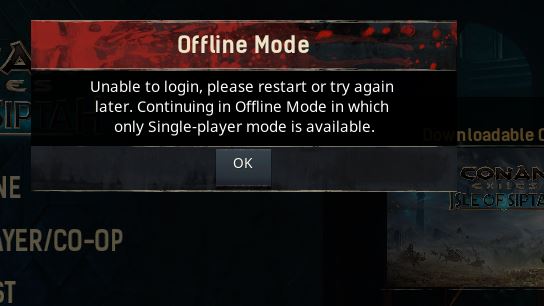
I did it twice to make sure before capturing this screen.
I’m open to suggestions.
Any ideas what’s going on now?
Does “Game Mode” being off have anything to do with this?
I use to rent a server, and this would mean I would not have been able to connect to it.
Looks like there’s an ongoing outage, judging from the reports in this thread:
I wouldn’t be surprised if Funcom Live Services were down.
I’ll be damned.
I had just thought of that about 5 minutes ago.