Same here again.
I can’t log in either! if it’s not the infinite loop screen, it’s the terrible lag.
This seems to work from the command line prompt:
In the task search bar:  type “cmd” and when the options appear select “Run as administrator”:
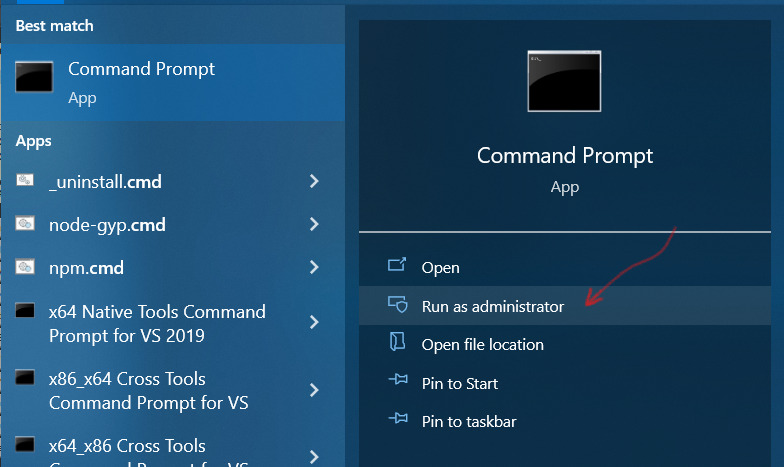
When the CLI opens paste this string quotes and all into the window:
"X:\SteamLibrary\steamapps\common\Conan Exiles\ConanSandbox\Binaries\Win64\ConanSandbox_BE.exe" -nosplash -BattlEye %command%where “X:” is the drive you have steam->Conan installed on. Then just press RETURN watch the magic happen.
It’s working for me anyway. 
I suppose you could put that in .BAT file as well… Then just double click that…
i am having the same issue, my GF and i cannot play a coop (it keeps infinite loading screen) and i cant create a private server with steam’s tool and not even the Conan Exiles Dedicated Server APP, could anyone help?
having the exact same infinate loading problem, unsubbing to all mods and starting up with a fresh no mods server still didn’t fix the issue, neither did unsubbing to all mods and having the game launcher re-download/verify them all.
yesterday unsubbing to all mods and restarting did work, but today that hasn’t worked at all
Why is this guy doing server down reports on an infinite loop thread with massive pictures?..
Anyway, I was gonna suggest manually starting the game from the executable with a manually edited modlist and even disabling the auto-subscribe ingame to prevent all the restarts and see if you can get more info, but seems like you sorted it! Nice!
My translator says that is no Earthly language… LOL
Yes yes…  but are you getting an infinite loop though?
Same problem here, started happening yesterday, running conanexiles launcher for dedicated server management, Every mod has status OK when joining, yet still causes looping.
Greetings,
We are still investigating what might be causing this. In the meantime, please try to delete both the following files: modlist.txt and servermodlist.txt
After deleting them, try to verify files on Steam again.
Apologies for all the trouble. We’ll keep working to solve this.
Still having this issue. Can confirm it is a glitch with mod verification. On Steam - game doesn’t seem to understand mods DON’T match, thinks they do and then restarts you only to have the game come back and the mods still haven’t been properly updated.
Hmm, I’m not sure about that. I think LBPR loads up fine without MCP, you simply can’t access the settings and it runs on default values. @Multigun could probably confirm that as he made LBPR
My guess though as to what happened is that you installed an additional mod which made both the server and client properly update all the other ones too. Something has been definitely off with the interaction between the game and the workshop, if you check the picture above by Uruk you can see that the version numbers actually match on the picture yet it’s still misidentifying it as the wrong version, which is really weird.
Either way glad you sorted it! I wonder if any secret background dev involvement took place and it’s a coincidence
MCP works fine with 3.0.
If you want to report an issue, please do so on my discord, and not blind accusations on a forum i very rarely check. If you are going to report an issue, extensive troubleshooting history and reproduction steps are required due to the vast volume of false bug reports and waisted time spent chasing those down.
Thanks. Muting the thread.
I think he’s just stressed out after doing 14 hour shifts to update everything on time and I could imagine a lot of people were bugging him with random stuff during that. That also probably was a very quick response without reading much of the context  Still a bit harsh, I agree.
As for the issue and the fix, I think it’s merely that the workshop has similar functionality as nexusmods, that you can mark certain mods as prerequisites and he probably ticked it in for MCP this time. However I still don’t think the loop was caused in any way by that… or who knows… it could be that people generally don’t use this prerequisite feature of the workshop so it does have some rare issue with conan servers. It definitely would be nice to get a certain answer, wonder if you could reproduce it by removing MCP
4 days still cant join the server 1977, stuck in infinite loading screen, by my past expiriences, it was a server side problem, that happened many times in the past, please take a look on that server and other with the same problem. It happened in the past and was solved server side.
I haven’t read thru all 51 posts here, but this is how everyone on our server is dealing with the loop. First, unsubscribe from all mods thru Steam. Then close Steam. Next, go delete modlist.txt and/or servermodlist.txt. Then go and try and start it. It’ll download the mods, restart and at that point we’re all able to get in. Coincidence? Maybe, but we don’t look a gift horse in the mouth.
i had no mods 
conan log shows that final lines and keep with this error channel 65 is not open:
[2022.09.06-12.38.00:213][108]LogVivox:Error: Unable to find matching character F6DE675CD98643469
[2022.09.06-12.38.58:163][585]LogNetPartialBunch:Error: Final partial bunch too large
[2022.09.06-12.38.58:163][585]LogNetTraffic:Error: UChannel::ReceivedRawBunch: Bunch.IsError() after ReceivedNextBunch 1
[2022.09.06-12.38.58:230][589]LogNetPartialBunch:Error: Final partial bunch too large
[2022.09.06-12.38.58:230][589]LogNetTraffic:Error: UChannel::ReceivedRawBunch: Bunch.IsError() after ReceivedNextBunch 1
[2022.09.06-12.39.02:464][843]LogNetTraffic:Warning: ReceivedNextBunch: Skipping bunch since channel isn’t fully open. ChIndex: 65
Keep repeating this last messafe till the client is closed
No use. I’ve made this all including unsubscribing mods via Steam Workshop but still can not enter my own dedicated server. There is some workaround to launch SP game (not to loose days from my BP) - but as soon as I try to join my server I get this infinite loop again and again. It’s not a universal desicion as you can see.